
Dans les environnements d’entreprise, nous devons répondre à de nombreuses exigences en matière de gestion des applications. L’un des défis les plus courants consiste à contrôler le moment d’installation des applications durant le processus d’enrôlement, notamment avec Windows Autopilot.
Prenons un exemple : vous avez comme prérequis que l’application « X » soit disponible dès que le bureau Windows est affiché (Windows Desktop loaded) et prête à être utilisée par l’utilisateur à l’issue du déploiement Autopilot. L’application ne doit être installée ni trop tôt afin de ne pas impacter l’expérience d’enrôlement, ni trop tard afin de garantir sa disponibilité immédiate dès l’arrivée sur le bureau.
L’objectif de ce blog est de s’assurer que l’application X ne s’installe qu’une fois l’ESP (Enrollment Status Page) terminée, à travers deux scripts PowerShell déployés via une application Win32.
Script 2 : contrôle l’installation de l’application en fonction de l’état du processus ESP.
Script 1 : copie les fichiers sources et crée une tâche planifiée qui exécutera le Script 2.
Actions effectuées
• Crée le dossier *C:\ProgramData\XXX\XXXX* s’il n’existe pas.
• Copie tous les fichiers du package (MSI/EXE + 2 scripts) dans ce dossier.
• Met à jour les fichiers du package lorsqu’une nouvelle version du MSI/EXE est détectée.
• Crée une tâche planifiée nommée « XXXX_PostESP_Install » afin d’installer notre application (XXXX) lors de la première connexion de l’utilisateur.
| Fichier | Role |
| Copy-XXXX-task.ps1 | Crée le répertoire d’installation, remplace le fichier d’installation lorsqu’une nouvelle version est détectée, puis crée la tache planifiée qui sera exécutée à la suite de l’ouverture du session Windows. |
| Install_XXXX_PostESP.ps1 | Vérifie que l’Enrollment Status Page (ESP) est terminée et, le cas échéant, que la configuration de WHFB est également finalisée. Une fois ces vérifications effectuées, le script lance l’installation de l’application |
| XXXX.msi/.exe | Fichier d’installation de l’application (quel que soit son format .msi ou .exe) |
NB: les trois fichiers listés dans le tableau, doivent etre présents ensemble dans le meme répertoire ava,t la création du package Intune.
Ces deux scripts seront encapsuler dans fichier .intunewin puis le crée une application WIN32 comme suit:
Program:
Install command: Powershell.exe -ExecutionPolicy Bypass .\Copy-XXXX-task.ps1
Uninstall command: cmd.exe /c
Rule type: File
Path: C:\ProgramData\XXXX\XXXX
File or folder : « Fichier d’installation de l’application MSI/EXE »
Detection method: File or folder exists
La méthode de détection et les deux scripts peuvent être modifier selon vos besoins
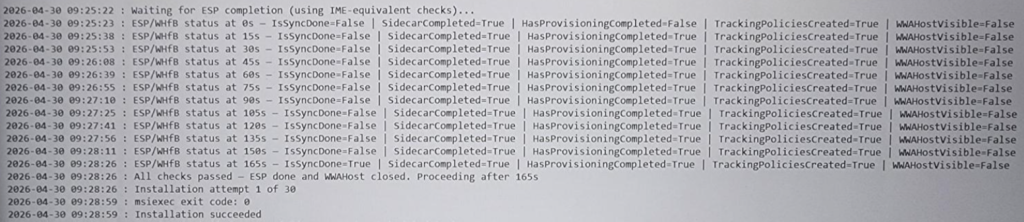
Exemple fichier log génerer par le script d’installation:
# ============================================================
# Copy-XXXX-task.ps1 - Payload Script (runs at AutoPilot phase 2)
# Purpose : Update source files if needed and create scheduled task.
#
# Triggered by : Intune application deployement services"
# RunAs        : SYSTEM
# Author       : Lazher YAAKOUBI
# Version      : 2.7.2
# ============================================================

# Folder where XXXX installation files must be copied
$XXXX = "C:\ProgramData\XXXX\XXXX"
$LogFile  = "$env:WINDIR\Temp\XXXX-Copy-TaskCreation.log"

# Find the MSI and script files
$InstallerSourceMSI = Get-ChildItem -Path $PSScriptRoot -Filter "*.msi" | Select-Object -First 1
$InstallerSourcePS1 = Get-ChildItem -Path $PSScriptRoot -Filter "*.ps1" | Where-Object { $_.Name -like "*Install_XXXX*" } | Select-Object -First 1

function Write-Log {
    param([string]$Message)
    $line = "$(Get-Date -Format 'yyyy-MM-dd HH:mm:ss') : $Message"
    Add-Content -Path $LogFile -Value $line -ErrorAction SilentlyContinue
}


# Check source files existance MSI&PS1
if (-not $InstallerSourceMSI) {
    Write-Log "Error: No MSI file found in $PSScriptRoot."
    exit
}

if (-not $InstallerSourcePS1) {
    Write-Log "Error: No installation script found in $PSScriptRoot."
    exit
}

$InstallerName = $InstallerSourceMSI.Name
$InstallerSource = $InstallerSourceMSI.FullName
$ScriptName = $InstallerSourcePS1.Name
$ScriptSource = $InstallerSourcePS1.FullName

$InstallerDest = Join-Path $XXXX $InstallerName
$ScriptDest    = Join-Path $XXXX $ScriptName

# Name of the scheduled task
$TaskName = "XXXXInstallIfMissing"

# Check if folder exists
if (-Not (Test-Path $XXXX)) {
    #
    try {
        New-Item -ItemType Directory -Path $XXXX -Force | Out-Null
        Write-Log "Folder $XXXX created successfully."
    } catch {
        Write-Log "Error: Failed to create folder $XXXX. $_"
        exit
    }

    Copy-Item -Path $InstallerSource -Destination $InstallerDest -Force
    Copy-Item -Path $ScriptSource    -Destination $ScriptDest    -Force
} else {
    Write-Log "XXXX folder already exists. Checking for updates..."

    # Update MSI if needed
    $ExistingMSI = Get-ChildItem -Path $XXXX -Filter "*.msi" -File
    if ($ExistingMSI) {
        $ExistingMSIVersion = [System.IO.Path]::GetFileNameWithoutExtension($ExistingMSI.Name) -replace 'XXXX-windows-', '' -replace '-x64', '' -replace '-corp', ''
        $NewMSIVersion      = [System.IO.Path]::GetFileNameWithoutExtension($InstallerName)    -replace 'XXXX-windows-', '' -replace '-x64', '' -replace '-corp', ''

        # Version comparison
        if (([version]$ExistingMSIVersion) -lt ([version]$NewMSIVersion)) {
            Write-Log "Newer MSI version detected ($NewMSIVersion). Updating..."
            Remove-Item -Path "$XXXX\*" -Force
            Copy-Item -Path $InstallerSource -Destination $InstallerDest -Force
            Copy-Item -Path $ScriptSource -Destination $InstallerDest -Force
        } else {
            Write-Log "Existing MSI version ($ExistingMSIVersion) is up to date."
        }
    } else {
        Copy-Item -Path $InstallerSource -Destination $InstallerDest -Force
    }

    # Always overwrite the script so it stays in sync with the MSI
    Copy-Item -Path $ScriptSource -Destination $ScriptDest -Force
    Write-Log "Installation script updated."
}

# Check if the scheduled task already exists
$ExistingTask = Get-ScheduledTask -TaskName $TaskName -ErrorAction SilentlyContinue
if ($ExistingTask) {
    Write-Log "Scheduled task '$TaskName' already exists. Skipping creation."
} else {
    # Define scheduled task action
    $Action = New-ScheduledTaskAction -Execute "powershell.exe" -Argument "-ExecutionPolicy Bypass -WindowStyle Hidden -File `"$ScriptDest`""

    # Define trigger
    $TriggerAtLogon = New-ScheduledTaskTrigger -AtLogOn

    # Define task principal (run as SYSTEM)
    $Principal = New-ScheduledTaskPrincipal -UserId "SYSTEM" -LogonType ServiceAccount -RunLevel Highest

    # Define settings
    $Settings = New-ScheduledTaskSettingsSet -AllowStartIfOnBatteries -DontStopIfGoingOnBatteries -StartWhenAvailable -ExecutionTimeLimit (New-TimeSpan -Days 0)

    # Register the task
    try {
        Register-ScheduledTask -TaskName $TaskName -Action $Action -Trigger $TriggerAtLogon -Principal $Principal -Settings $Settings -Force -ErrorAction Stop
        Write-Log "Scheduled task '$TaskName' created successfully." #| Out-File -FilePath "$env:WINDIR\Temp\TaskCreation.log" -Append
    } catch {
        Write-Log "Failed to create scheduled task: $_" #| Out-File -FilePath "$env:WINDIR\Temp\TaskCreation.log" -Append
    }
}
Install_XXXX_PostESP.ps1:
• Nombre maximal de tentatives : 30
• Délai entre chaque tentative : 5 minutes
• Si les 30 tentatives échouent : la tâche planifiée reste active et une nouvelle tentative sera effectuée lors de la prochaine connexion de l’utilisateur.
# ============================================================
# Install_XXXX_PostESP.ps1 - Payload Script (runs at logon)
# Purpose : Wait for Autopilot ESP Phase 3 to finish, then
#           install XXXX MSI with retry logic.
#
# Triggered by : Scheduled Task "XXXXInstallIfMissing"
# RunAs        : SYSTEM
# Author       : Lazher YAAKOUBI
# Version      : 2.7.2
# ============================================================

$XXXX  = "C:\ProgramData\XXXX\XXXX_Source"
$LogPath        = "$env:WINDIR\Temp\install_XXXX.log"
$LogFile        = "$env:WINDIR\Temp\XXXX-install-attempt.log"
$TaskName       = "XXXXInstallIfMissing"
$filePath       = "C:\Program Files\XXXX\XXXX.exe"

# Check MSI file...
$InstallerSourceMSI = Get-ChildItem -Path $XXXX -Filter "*.msi" | Select-Object -First 1
if (-not $InstallerSourceMSI) {

    Add-Content -Path $LogFile -Value "$(Get-Date -Format 'yyyy-MM-dd HH:mm:ss') : ERROR - No MSI found in $XXXX. Exiting." -ErrorAction SilentlyContinue
    exit 1
}

$InstallerName = $InstallerSourceMSI.Name
$InstallerPath = Join-Path $XXXX $InstallerName

# e.g. "XXXX-windows-4.2.0.172-x64" -> "4.2.0.172"
$MSIVersion = [System.IO.Path]::GetFileNameWithoutExtension($InstallerPath) `
              -replace 'XXXX-windows-', '' `
              -replace '-x64', '' `
              -replace '-corp', '' `
              -replace '-[a-zA-Z].*$', ''   # catch any other suffix

function Write-Log {
    param([string]$Message)
    $line = "$(Get-Date -Format 'yyyy-MM-dd HH:mm:ss') : $Message"
    Add-Content -Path $LogFile -Value $line -ErrorAction SilentlyContinue
}

# -------------------------------------------------------
# 0. Guard : skip if XXXX is already installed
# -------------------------------------------------------
if (Test-Path $filePath) {
    # Normalise FileVersion
    $rawFileVersion = (Get-Item $filePath).VersionInfo.FileVersion -replace '\s.*$', ''

    if ($rawFileVersion -eq $MSIVersion) {
        Write-Log "XXXX $rawFileVersion already installed - removing scheduled task and exiting."

        if (Get-ScheduledTask -TaskName $TaskName -ErrorAction SilentlyContinue) {
            Unregister-ScheduledTask -TaskName $TaskName -Confirm:$false -ErrorAction SilentlyContinue
            Write-Log "Scheduled task '$TaskName' removed."
        } else {
            Write-Log "Scheduled task '$TaskName' does not exist."
        }

        exit 0
    } else {
        Write-Log "Installed version ($rawFileVersion) differs from MSI version ($MSIVersion) - proceeding with installation."
    }
}

Write-Log "Waiting for ESP completion (using IME-equivalent checks)..."

$espWaitSeconds = 0
$espMaxWait     = 18000  # 5 h
$pollInterval   = 15     # seconds between checks

# ---------- Check 1: IsSyncDone ----------
function Test-IsSyncDone {
    $enrollments = Get-ChildItem "HKLM:\SOFTWARE\Microsoft\Enrollments" -ErrorAction SilentlyContinue
    foreach ($enrollment in $enrollments) {
        $providerID = (Get-ItemProperty -Path $enrollment.PSPath -Name "ProviderID" -ErrorAction SilentlyContinue).ProviderID
        if ($providerID -ne "MS DM Server") { continue }

        $firstSyncPath = Join-Path $enrollment.PSPath "FirstSync"
        $userSidKeys = Get-ChildItem -Path $firstSyncPath -ErrorAction SilentlyContinue
        foreach ($sidKey in $userSidKeys) {
            $isSyncDone = (Get-ItemProperty -Path $sidKey.PSPath -Name "IsSyncDone" -ErrorAction SilentlyContinue).IsSyncDone
            if ($isSyncDone -eq 1) { return $true }
        }
    }
    return $false
}

# ---------- Check 2: Sidecar InstallationState ----------update must be performed to resolve issues related to failed autopilot device!!!
function Test-SidecarCompleted {
    $enrollments = Get-ChildItem "HKLM:\SOFTWARE\Microsoft\Enrollments" -ErrorAction SilentlyContinue
    foreach ($enrollment in $enrollments) {
        $sidecarPath = Join-Path $enrollment.PSPath "PolicyProviders\Sidecar"
        $state = (Get-ItemProperty -Path $sidecarPath -Name "InstallationState" -ErrorAction SilentlyContinue).InstallationState
        if ($state -eq "Completed") { return $true }
    }
    # If Sidecar key doesn't exist at all, it's not blocking ESP
    return $true
}

# ---------- Check 3: HasProvisioningCompleted (WMI) ----------
function Test-HasProvisioningCompleted {
    try {
        $result = Get-WmiObject -Namespace "root\cimv2\mdm\dmmap" `
            -Query "SELECT HasProvisioningCompleted FROM MDM_EnrollmentStatusTracking_Setup01" `
            -ErrorAction Stop
        if ($null -ne $result -and $result.HasProvisioningCompleted -eq $true) { return $true }
    } catch {
        return $true
    }
    return $false
}

# ---------- Check 4: TrackingPoliciesCreated (WMI) ----------
function Test-TrackingPoliciesCreated {
    try {
        $result = Get-WmiObject -Namespace "root\cimv2\mdm\dmmap" `
            -Query "SELECT TrackingPoliciesCreated FROM MDM_EnrollmentStatusTracking_PolicyProviders03_01" `
            -ErrorAction Stop
        if ($null -ne $result -and $result.TrackingPoliciesCreated -eq $true) { return $true }
    } catch {
        return $true
    }
    return $false
}

# ---------- Check 5: WWAHost.exe Running ----------
function Test-WWAHostVisible {
    $wwa = Get-Process -Name "WWAHost" -ErrorAction SilentlyContinue |
           Where-Object { $_.SessionId -gt 0 }
    return ($null -ne $wwa)
}

# ---------- Main polling loop ----------
do {
    $c1 = Test-IsSyncDone
    $c2 = Test-SidecarCompleted
    $c3 = Test-HasProvisioningCompleted
    $c4 = Test-TrackingPoliciesCreated
    $c5 = Test-WWAHostVisible

    Write-Log ("ESP/WHfB status at ${espWaitSeconds}s - " +
               "IsSyncDone=$c1 | SidecarCompleted=$c2 | " +
               "HasProvisioningCompleted=$c3 | TrackingPoliciesCreated=$c4 | " +
               "WWAHostVisible=$c5")

    if ($c1 -and $c2 -and $c3 -and $c4 -and (-not $c5)) {
        Write-Log "All checks passed - ESP done and WWAHost closed. Proceeding after ${espWaitSeconds}s."
        break
    }

    Start-Sleep -Seconds $pollInterval
    $espWaitSeconds += $pollInterval

} while ($espWaitSeconds -lt $espMaxWait)

# -------------------------------------------------------
# 2. INSTALL XXXX WITH RETRY LOGIC
# -------------------------------------------------------
if (-Not (Test-Path $InstallerPath)) {
    Write-Log "ERROR: Installer not found at $InstallerPath"
    exit 1
}

# This line must be updated with the appropriate code for your application!!!!
$msiArgs = "/i `"$InstallerPath`" /qn /l*v `"$LogPath`" " +
           "STRICTENFORCEMENT=1 " +
           "CLOUDNAME=XXXX " +
           "USERDOMAIN=XXXX " +
           "POLICYTOKEN=391083766XXXXXXXXXXXXXXXXXX " +
           "REBOOT=ReallySuppress"

$maxAttempts = 30
$attempts    = 0
$success     = $false

while (-not $success -and $attempts -lt $maxAttempts) {
    $attempts++
    Write-Log "Installation attempt $attempts of $maxAttempts"

    try {
        $process = Start-Process "msiexec.exe" `
            -ArgumentList $msiArgs `
            -Wait -PassThru -NoNewWindow -ErrorAction Stop

        Write-Log "msiexec exit code: $($process.ExitCode)"

        switch ($process.ExitCode) {
            0    { $success = $true ; Write-Log "Installation succeeded." }
            3010 { $success = $true ; Write-Log "Installation succeeded (reboot required - suppressed)." }
            1618 { Write-Log "Another MSI installation in progress (1618) - retrying in 5 min..." ; Start-Sleep -Seconds 300 }
            1619 { Write-Log "Package could not be opened (1619) - retrying in 5 min..." ; Start-Sleep -Seconds 300 }
            default {
                Write-Log "Unexpected exit code $($process.ExitCode) - retrying in 5 min..."
                Start-Sleep -Seconds 300
            }
        }
    } catch {
        Write-Log "ERROR launching msiexec: $_"
        Start-Sleep -Seconds 300
    }
}

# -------------------------------------------------------
# 3. FINAL STATUS
# -------------------------------------------------------
if ($success) {
    Write-Log "XXXX installed successfully - removing scheduled task."
    Unregister-ScheduledTask -TaskName $TaskName -Confirm:$false -ErrorAction SilentlyContinue

    Write-Log "Cleaning up XXXX_Source folder (full removal)..."
    Remove-Item -Path "$XXXX\*" -Exclude $InstallerName -Confirm:$false -Recurse -ErrorAction Stop
    exit 0
} else {
    Write-Log "FAILED after $maxAttempts attempts - scheduled task remains for next logon retry."
    exit 1
}
0 commentaires